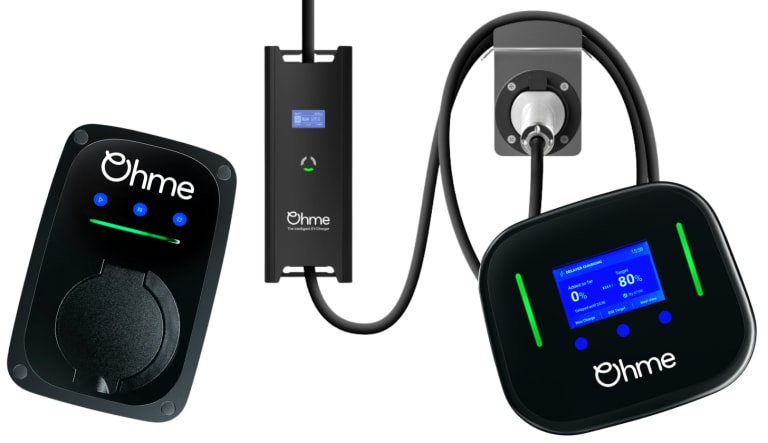
Which Ohme have you got?
Three generations, three different ways of showing red. Choose yours to jump straight to it.
-

Ohme Home Pro (tethered, with a screen and two thin light strips). Red on the strips is an error. Separately, the screen turns red when Max Charge is on, which is not an error at all.
Jump to Home Pro -

Ohme ePod (untethered, a light bar and three touch buttons). Red only ever appears in the right hand corner of the bar, blinking or solid.
Jump to ePod -

Ohme Home and Ohme Go (older, a ring of red, green and yellow segments). Red is part of normal operation and only the flashing combinations mean a fault.
Jump to Home/Go
The model is on the label on the unit, and the shape gives it away.
Red on the Ohme Home Pro light strips
Ohme’s own legend for the Home Pro strips is short.
| Light | Ohme’s meaning |
|---|---|
| No light | Finished, or nothing plugged in |
| Blue | A scheduled delay |
| Solid green | Plugged in but not drawing power |
| Green fading in and out | Charging |
| Red | An error, contact customer care |
Ohme’s help centre does not publish a table of different red patterns for the Home Pro, so unlike the ePod there is only the one red state to read.
Two things to rule out before you call it a unit fault:
- The screen is red, not the strips. Max Charge turns the display red on purpose. If you or someone in the house tapped it, that is why.
- The error is a voltage pause. Ohme chargers must pause if the supply goes above 253 volts or below 207, and they show a red flashing error while paused. On a Home Pro you can read the live voltage by tapping Next View twice. If the number is outside those limits, it is your supply, not the charger, and it restarts by itself when the voltage settles.
If the strips are red, the screen is not in Max Charge and the voltage reads normal, then it is an error in the unit and worth a reset before anything else.
Red in the corner of the Ohme ePod
The ePod shows two red states, both in the rightmost part of the light bar:
| Light | Ohme’s meaning | What to do |
|---|---|---|
| Blinking red corner | Error, reboot required | Hold the Stop button for ten seconds to reboot the charger (Ohme’s button table says three seconds, its light guides say ten, so ten covers both) |
| Solid red corner | Fault | Ohme’s guide says contact Ohme support. Switching the charger off at its breaker on the fuse board, waiting, and switching it back on first costs nothing. If it comes back solid red, that is a support call inside the warranty, or us outside it |
The same voltage rule applies to the ePod. A red flashing error while charging is paused often means the mains has drifted outside 207 to 253 volts, and it clears on its own once the supply settles. If the corner keeps blinking after that, hold Stop for ten seconds.
It is also worth knowing that the ePod shows orange, not red, when it cannot talk to the car (solid orange) or when it is connecting to the internet (blinking orange corner). People read orange as red on a phone photo. Neither is a fault in the unit.
Red is normal on the Ohme Home and Go
The older ring of lights uses red as an everyday colour, so do not panic at it. From Ohme’s own guide:
| Lights | Meaning |
|---|---|
| Steady green | Waiting, ready to plug in |
| Flashing green | Plugged in, waiting to connect to the car |
| Steady red | Connected, waiting for the car to accept the charge |
| Lights flashing in sequence | Waiting for the schedule to start |
| Steady red with flashing green | Charging |
| Flashing yellow | Electrical fault |
| All lights flashing together | EV fault |
So steady red on a Home or Go is the charger waiting for the car, and steady red with green flashing is a normal charge. The two faults are the yellow flash and the all together flash, and Ohme’s guide sends both to customer care.
The two red causes that are not the Ohme
Voltage. Covered above, but it is the commonest one and it is worth repeating. The charger is doing what the regulations require. If it happens most evenings, ask your electricity network operator to monitor the supply over a few days. There is more on this in the next section, because it is a common one and the hardest for an owner to pin down.
PEN protection. Every Ohme has built in open PEN detection, so it does not need an earth rod. If the supply earth is lost, or the voltage sits outside limits, it disconnects the car from live, neutral and earth. The Home Pro manual adds a detail worth knowing. After the voltage recovers, the charger will not reconnect the car for five minutes, so a red error that clears after a short wait is often this working correctly.
Voltage spikes from the network, a common red that is not your house
One we come up against a lot is a voltage spike on the network side, upstream of your meter. It is nothing to do with your house and nothing to do with the installation. It is the network operator’s supply, and it clusters in certain areas. We see it in parts of North London far more than anywhere else we work.
The reason owners cannot get to the bottom of it is that it fixes itself. The charger refuses to authorise a charge until the voltage settles, shows red while it waits, then starts charging again as if nothing happened. By the time anyone looks, the light is back to normal and there is nothing to see. All the owner is left with is a charger that “keeps going red”.
The reason a charger notices what the rest of the house ignores is that it has to. A kettle or a fridge does not measure the supply. An EV charger does, because the wiring regulations use a voltage outside 207 to 253 volts as the sign that the supply earth may have been lost, and require the charger to disconnect the car. So the charger is the most sensitive thing on the premises by design, and it is the first to complain when the network drifts.
What we do is get the evidence. The charger keeps a log of every error and the time it happened, and the manufacturer can read it. We have had other manufacturers pull that log for us, and with an Ohme the same request goes to Ohme support, who can see the unit over its 4G link. Often that gives a pattern, the same hour most evenings, or a run of spikes over a week, and that pattern is what tells us whether it is something the network operator needs to know about. A log with times on it gets a very different response from a DNO than “my charger goes red sometimes”.
Your network operator has a legal duty to keep the supply within 230 volts, plus 10 percent and minus 6 percent, so 216 to 253 volts, under the Electricity Safety, Quality and Continuity Regulations. If the logs show it outside that band, they should investigate.
- Call 105 from any phone. It is free and connects you to the network operator for your area, whichever company that is.
- Not sure who your operator is? The Energy Networks Association has a postcode lookup, linked in the sources at the foot of this page. Most of London is UK Power Networks.
- Or send us the model and a photo of the red, and we will pull the logs and speak to the operator for you.
When red means the Ohme itself
A red that comes back after a reboot and a fifteen minute power off, with the voltage reading normal and the car happily charging elsewhere, is a fault in the charger. Inside Ohme’s three year warranty a fault in the unit is an Ohme call, with on site assistance, repair or replacement at no cost. Outside it, or where you cannot get anyone to come, put the pattern in our remote survey and we will tell you what we think before we come out.