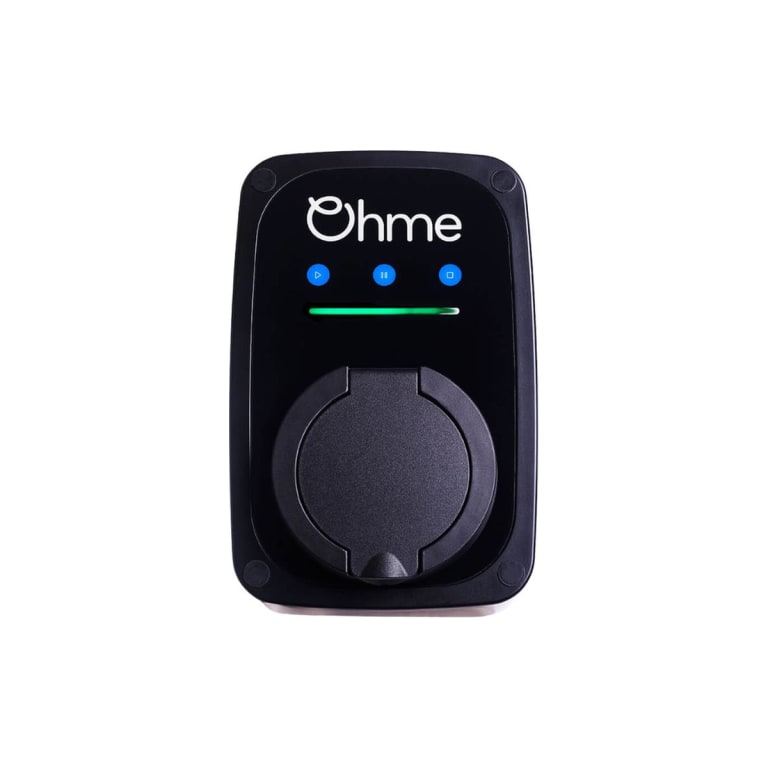
How the Ohme ePod light bar works
The ePod has no screen. A single light bar runs along the top of the front face, above the three touch buttons, and it uses colour, movement and the right hand corner of the bar to tell you what is going on. Ohme’s own status guide shows every state as a short animation, and the table below is that guide written down. “Moving” means the light travels along the bar, “blinking” means it flashes, and “corner” means only the right hand end is lit.
Normal ePod light patterns
| Light | State | What it means |
|---|---|---|
| Blinking orange corner | Connecting to internet | The charger is reaching Ohme’s servers over 4G |
| Solid green | Idle | Online, ready to plug in |
| Solid green with a green corner | Plugged in | Car connected, nothing scheduled yet |
| Moving purple | Approval pending | Waiting for you to approve the session in the app |
| Moving green | Scheduling a smart charge | Working out when to charge on your tariff |
| Solid blue | Smart charge, scheduled delay | Waiting for the cheap window |
| Moving blue | Smart charge, charging | Charging on the schedule |
| Blinking green | Charging complete | Finished |
| Solid yellow | Smart charge scheduled, solar enabled | Waiting, with your solar set to feed the charge |
| Moving yellow | Smart charge charging, solar enabled | Charging with solar in the mix |
Max Charge and pauses on the ePod
| Light | State | What it means |
|---|---|---|
| Solid white | Max Charge, scheduled delay | You asked for a delayed Max Charge, two hours at a time up to eight. The number of lit segments shows how many hours |
| Blinking blue | Max Charge, charging | Charging at full rate now |
| Blinking white | Charging paused | Paused from the app or the Pause button |
| Blinking purple when touched | Buttons locked | The front buttons are locked in the app, not a fault |
| Moving white | Configuration in progress | An installer is changing settings through Ohme’s installer portal |
ePod error lights, red and orange
| Light | State | What to do |
|---|---|---|
| Solid orange | Error, communicating with vehicle | The car is not answering the charger. Unplug and replug, then check the car |
| Blinking red corner | Error, reboot required | Hold Stop for ten seconds |
| Solid red corner | Fault | Ohme’s guide says contact Ohme support. Switching off at the breaker on the fuse board, waiting and switching on first costs nothing. If it comes back solid red, that is the call |
Every red state, and what usually sits behind it, is on our red light page.
The waiting light that is the law, not a fault
This is one we come across a lot, on Ohme and on other brands, and almost nobody knows about it. Every home charger sold in the UK has to apply a randomised delay before it starts charging. It is regulation 11 of the Smart Charge Points Regulations. The delay is a random length up to ten minutes, it is on by default, and it applies each time the charger would start pushing power, not just the first time.
The reason it exists is the grid. If every car on a street started the second a cheap rate began, they would all hit the network at once. A few random minutes each spreads that out.
What it looks like to you is a charger that is plugged in, showing a normal waiting light, and doing nothing. You pressed Play, or held Play for Max Charge, and expected power. Ten minutes later it starts on its own with no explanation. Ohme’s light guide has no dedicated colour for this, so on an ePod the delay simply looks like one of the waiting states, green with the corner lit if it is sitting plugged in, or moving green while it works out a schedule. Other brands do flag it. Our EO lights page lists a cyan bar for exactly this.
So before you decide an ePod is faulty because it will not start, plug in and give it ten minutes. If it starts on its own, nothing is wrong with it.
The delay can be cancelled, and the regulations require that you are able to. Your installer may have switched it off at commissioning, or may not have. It is also worth knowing that a firmware update can put a setting like this back to its default, which is why a charger that always started instantly can suddenly begin pausing. If yours has started doing that and you would rather it did not, that is a setting, not a repair.
The ePod’s three buttons
From Ohme’s manual, press Play to start or resume, and hold Play three seconds for Max Charge. Press Pause to pause, and hold Pause three seconds to delay a Max Charge by two hours at a time, which works only when the charger is offline. Press Stop to cancel, and hold Stop to reboot. Ohme’s button table says three seconds and its light guides say ten, so hold it for ten. Hold all three for five seconds to accept a remote configuration request from Ohme or your installer.
The three ePod lights that catch people out
Solid blue for hours. Not stuck. It is a smart charge waiting for your tariff’s cheap window, and the default off peak hours every UK home charger ships with under the Smart Charge Points Regulations mean it will wait even before you set a tariff. If you need charge now, hold Play.
Solid orange. People read it as red on a phone photo. It means the car and charger are not talking, which on the units we look after is usually the car end, a timer, a charge limit, or a cable not fully home.
Nothing at all. No light means no power to the unit. Check the breaker before anything else. If the breaker is on and the bar stays dark, that is a fault in the unit.